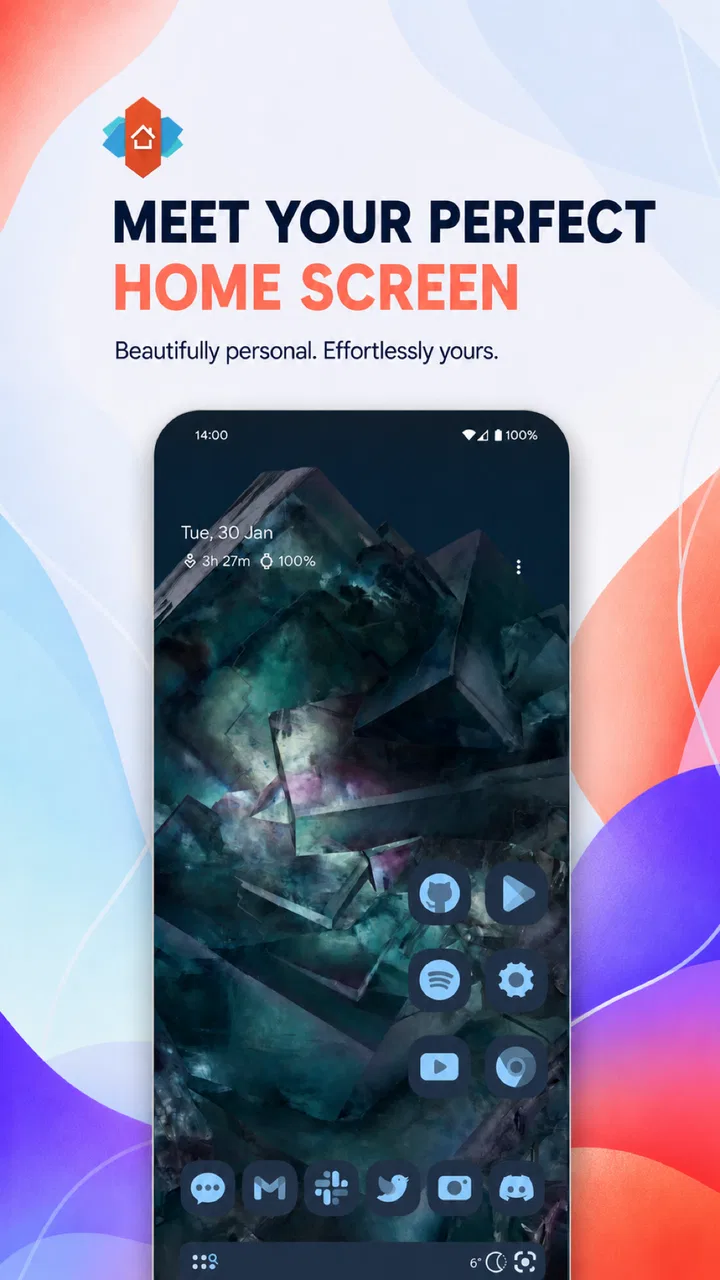
Nova Launcher: Home Screen
- 3.2
- Rating
- 100.00M
- Installs
- Free
- Price

 Analysis by App-foxy
I spent time with Nova Launcher: Home Screen as a daily home-screen replacement, and my overall impression is straightforward: it is still one of the most useful ways to make an Android phone feel personally arranged rather than preassembled. The app gives you control over the layout, appearance, gestures, and behavior of the screen you see most often. That flexibility is its main attraction, but it also creates the app’s biggest weakness: getting the result you want can take patience.
Nova Launcher belongs to the personalization category and is developed by Instabridge Sweden AB. It is free to install, suitable for Everyone, and supports Android 8.0 and later. Its current version is 87800, shown as 8.7.8. The app has passed the 100 million install mark and holds an average of 3.2 from around 1.4 million ratings, with roughly 79 thousand written reviews. Those figures suggest a very broad audience, although the middling average also hints that the experience is not equally comfortable for everybody.
What makes Nova Launcher useful in everyday Android use
The first thing I noticed was how much less I had to accept as fixed. Instead of treating the manufacturer’s home screen as a permanent arrangement, I could decide how many icons belonged on each page, how much space widgets should occupy, and whether the app drawer should feel dense or relaxed. That matters when your phone is used for very different tasks throughout the day. I could keep communication, travel, work, and entertainment close at hand without letting one crowded page become the whole experience.
You May Also Like

 AccuWeather: Weather Radar
AccuWeather Review: A Quick, Clear Forecast for Everyday Decisions
For everyday plans, the best forecast is the one you can understand quickly. AccuWeather makes rain timing, radar, and local conditions easy to act on, with a few trade-offs.

 Hill Climb Racing
Why Hill Climb Racing Still Turns Crashes Into One More Run
A tiny car, a bumpy hill and one more upgrade: Hill Climb Racing keeps resurfacing because its simple chaos makes every near-miss feel personal.

 AliExpress - Shopping App
AliExpress Makes Global Shopping Feel Personal, but Shoppers Bear the Risk
AliExpress turns a global marketplace into a pocket-sized discovery engine. Its reach is useful, its shopping loop compelling, and its trade-offs easy to miss.

 Lords Mobile: Kingdom Wars
Lords Mobile Is a Kingdom-Building Routine, Not a Quick Match
A case-by-case verdict on the building, battles, device demands, and social commitments that make Lords Mobile rewarding for some players and exhausting for others.

 PDF Scanner app - TapScanner
TapScanner Makes Paperwork Easier to Capture, Check, and Share
TapScanner makes scanning with a phone feel less like a rescue operation and more like a dependable step in getting work done. Its capture tools are useful, though not flawless.

 Block Blast!
Block Blast! Shows How Much a Puzzle Game Can Leave Out
A quiet grid game shows why puzzle players increasingly value instant clarity, repeatable skill and low-pressure play—and where the genre still needs to catch up.
More From Our News Desk
View All News


The practical strength is not simply that the screen can look different. It is that the layout can reflect how I actually use the phone. I prefer a small group of essential apps on the first page, a separate page for widgets, and an app drawer for everything else. Someone else may want a single page with folders and a large calendar. Nova Launcher accommodates both approaches instead of forcing a particular manufacturer design.
I also found the app helpful when moving between phones with different software styles. A new device often brings its own launcher, icon spacing, search placement, and gesture behavior. Rebuilding the same arrangement in Nova Launcher makes the transition less disruptive. It does not magically copy every part of a phone’s interface, but it gives me a familiar starting point and reduces the time spent hunting through menus.
One of the less obvious advantages is the way small layout decisions affect reachability. I can place frequently used icons lower on the screen, where they are easier to tap with one hand, while leaving less important shortcuts higher up. This is more useful than a purely decorative theme. On a large phone, a carefully arranged bottom row can save repeated stretching, especially when I am walking, carrying a bag, or using the device quickly.
Personalization that serves a purpose
Nova Launcher is at its best when customization solves a real annoyance. If a manufacturer adds a permanent row of suggested apps, uses oversized spacing, or places the app drawer in an inconvenient location, I can reshape the experience. I can also make the home screen calmer by removing visual clutter rather than adding more decoration. For me, the best setup was not the most elaborate one; it was the one that made the next action obvious.
Folders are particularly valuable for controlling clutter. I use them for apps that I need occasionally but do not want scattered across several pages. A folder for finance, another for transport, and another for media keeps the main screen focused. The trade-off is that folders add one extra tap, so I would not hide apps I open constantly. Nova Launcher gives me the freedom to make that decision instead of deciding for me.
Widgets also benefit from the flexible grid. A calendar, weather panel, or task list can be given enough room to remain readable without taking over the entire screen. I found that a widget often works better when it has breathing space around it, even if that means fewer icons fit beside it. This is a small design choice, but it can make the phone feel much more deliberate.
Another useful workflow is separating visual simplicity from app access. I can keep the home screen nearly empty and rely on the app drawer when I want a quieter appearance. Alternatively, I can create a practical dashboard with the apps and information I use most. This makes Nova Launcher suitable for people who want a minimalist phone as well as those who want a highly organized one.
Gestures and shortcuts reward careful setup
The gesture options are where the launcher begins to feel more powerful than a cosmetic replacement. I can use actions such as swiping on an area of the home screen to reach something quickly, rather than placing another icon in an already busy layout. The important point is to assign gestures to actions I can remember. If I create too many hidden shortcuts, the system becomes clever but difficult to use.
My preferred approach is to reserve only a few gestures for actions that I perform repeatedly. A downward gesture can be useful for reaching notifications, while another can open a frequently used search or app function. The exact choices depend on the phone and the rest of the system, but the principle is consistent: use gestures to remove repetition, not to turn the home screen into a puzzle.
There is a learning cost here. When a shortcut is visible, I can understand it immediately. A gesture is invisible until I remember it, and that can be frustrating for family members or anyone who occasionally borrows the phone. I would recommend writing down the small set of gestures during setup, then removing any that do not become natural after a few days.
Nova Launcher can also make app organization feel more intentional through drawer categories and sorting choices. This is useful for people with a large collection of apps, because the drawer does not have to remain one long, undifferentiated list. Still, organization takes maintenance. If I install many new apps and never review the arrangement, the benefit gradually fades.
A realistic daily scenario
Imagine starting the morning with a phone that has a calendar widget, a weather view, and a small row of communication apps on the first page. During a commute, the transport folder is one tap away, while entertainment apps stay out of sight. At work, the second page holds notes, documents, and email. In the evening, a gesture opens the app drawer instead of forcing a search through several pages. This is the kind of improvement I noticed: not a dramatic new function, but less friction repeated all day.
For a shared household phone, I would take a different approach. I would keep the layout conventional, avoid obscure gestures, and use clear folders. A setup that feels elegant to its creator can feel confusing to somebody else. Nova Launcher gives enough control to build an accessible arrangement, but it does not automatically protect users from over-customizing.
Where the experience becomes less comfortable
The main limitation is complexity. The first installation is easy enough, but creating a polished setup involves many small decisions: grid size, icon placement, drawer behavior, gestures, folders, and visual details. The number of choices can be exciting for enthusiasts and tiring for people who only want a slightly cleaner screen.
I also found that the launcher’s flexibility can encourage endless tweaking. It is easy to spend more time adjusting spacing than enjoying the result. My advice is to begin with one practical goal, such as fitting a calendar and a few essential apps on the first page. Once that works, stop and use the phone for several days before changing anything else.
There can also be differences between Nova Launcher and the phone’s built-in software. Android manufacturers sometimes tie certain functions closely to their own launcher, especially system search, device-specific widgets, or special gestures. Nova Launcher may not reproduce every manufacturer feature in exactly the same way. If you rely heavily on a proprietary home-screen panel, replacing the default launcher may mean giving up part of that integration.
Gesture navigation can require extra attention as well. A swipe that feels natural inside the launcher may compete with a system gesture at the edge of the screen. Whether this is a serious problem depends on the phone, Android version, and chosen settings. I would test the launcher with the phone’s navigation mode before investing time in a detailed layout.
The free model makes it easy to try, but in-app purchases range from $0.99 to $99.99 per item. I would not treat the free download as a promise that every advanced customization is included without cost. The sensible approach is to install it, build a basic layout, and decide whether the extra controls are worth paying for your particular routine.
The rating of 3.2 is worth considering without treating it as a final verdict. A launcher is unusually personal: one user may value deep control, while another may see the same controls as unnecessary complication. The large number of ratings shows that the app has been tried widely, but it does not guarantee that it will behave identically across every manufacturer’s phone.
Who should use it, and who should skip it
I recommend Nova Launcher to Android users who are dissatisfied with the default home screen and can describe what they want to change. It is especially suitable for people who need a more efficient app arrangement, want to reduce clutter, or move between devices and prefer a consistent layout. It is also a good fit for anyone who enjoys refining the interface until it matches personal habits.
It is less suitable for someone who wants a completely hands-off experience. If the default launcher already feels fast, clear, and comfortable, changing it may create more work than benefit. I would also be cautious about recommending it to a person who depends on manufacturer-specific panels or wants every system feature to behave exactly as it did out of the box.
Compared with a phone’s standard launcher, Nova Launcher generally offers more control over organization and appearance, but the built-in option usually has the advantage of tighter integration and simpler setup. Compared with minimalist launchers, Nova Launcher is broader and more adjustable, though it may feel busy by comparison. Compared with highly visual theme-focused launchers, it is more concerned with structure and behavior than with presenting a ready-made artistic look.
That comparison leads to my clearest advice: choose Nova Launcher when you want to design your own workflow, not merely apply a new wallpaper. If your priority is a single polished style with almost no decisions, another launcher may be more comfortable. If your priority is control over how the phone is arranged and accessed, Nova Launcher is the stronger candidate.
My final recommendation after using it
Nova Launcher: Home Screen remains a convincing personalization app because it turns the home screen into something I can organize around real behavior. Its strongest feature is not one isolated visual option; it is the ability to combine layout, folders, widgets, app-drawer organization, and a small number of gestures into a system that feels personal.
The experience is not effortless. Setup can become overly detailed, some phone-specific features may not translate perfectly, and advanced options can tempt users into constant adjustment. I would start with the free version, create a restrained layout, and test it through ordinary routines before buying anything. If the arrangement saves taps and makes important apps easier to reach, the customization is doing useful work.
For me, the app earns a recommendation for organized Android users who want more say in their daily interface. I would not recommend it simply because customization is available. I would recommend it when the default launcher is actively getting in the way. In that situation, the best reason to install Nova Launcher is practical control rather than decoration, and that remains a meaningful advantage.
Its store summary presents the idea of making the home screen feel like your own, but my experience is more specific: the app is most valuable when I use its flexibility to remove friction, not to add complexity. Set it up with a clear purpose, keep the gestures memorable, and resist changing everything at once. Used that way, it can make an Android phone feel noticeably more natural without requiring a completely different device.
As a free app for Everyone with a long presence on Android since February 23, 2012, it is easy to try, and its broad install base makes it a familiar option in this space. My final judgment is positive but selective: Nova Launcher is a strong choice for users who want an adjustable home screen, but the default launcher remains better for people who value simplicity and built-in integration above all else.
FAQs for Nova Launcher: Home Screen
01What features does Nova Launcher offer?
Nova Launcher provides a customizable home screen experience on Android devices. It offers features like custom icon themes, app drawer customization, scrollable docks, and gesture controls. Users can also enjoy night mode, backup and restore options, and integration with Google Discover. These features allow for a personalized and efficient user interface.
02Is Nova Launcher compatible with my device?
Nova Launcher is compatible with most Android devices running version 5.0 (Lollipop) and above. It is designed to work smoothly across a wide range of smartphones and tablets, ensuring that users can benefit from its features regardless of their device model. Always check for specific compatibility details on the app store before downloading.
03Does Nova Launcher affect battery life?
Nova Launcher is optimized for performance and generally does not significantly impact battery life. However, the effect on battery can vary based on individual settings and usage patterns, such as the number of widgets and gestures used. It’s advisable to monitor battery usage initially and adjust settings for optimal performance.
04Can I use Nova Launcher without purchasing the Prime version?
Yes, Nova Launcher is available in a free version with a wide range of features. However, upgrading to Nova Launcher Prime unlocks additional functionalities such as more gesture controls, unread counts, and the ability to hide apps. Users can choose based on their needs and whether they want the enhanced features provided by the Prime version.
05How can I backup and restore my Nova Launcher settings?
Nova Launcher offers a built-in backup and restore feature. Users can save their current layout and settings by navigating to the app’s settings, selecting ‘Backup & Import Settings,’ and choosing ‘Backup.’ To restore, simply select ‘Restore’ and choose the desired backup file. This ensures easy transition between devices or after a factory reset.
Pros
- Highly customizable interface.
- Smooth performance and transitions.
- Frequent updates and support.
- Offers a wide range of themes.
- Improved app organization features.
Cons
- Some features require premium upgrade.
- Overwhelming options for new users.
- Limited widget customization.
- Occasional minor bugs.
- May affect battery life slightly.

Nova Launcher: Home Screen
Gallery